Showing posts with label apps. Show all posts

Physics Gizmo is Open Source

I've put the source to Physics Gizmo on GitHub. If you are interested in helping me develop a tool for students to collect and analyze scientific data in an affordable way I encourage you to join the project.


Physics Gizmo on GitHub
Discussion Group Forum

Physics Gizmo on Google Play

More information on Physics Gizmo can be found at the original Physics Gizmo post on BrokenAirplane.


Subscribe and Connect to see how educators are innovating.

Physics Gizmo is updated to version 2.2

Physics Gizmo is updated to version 2.2 for phones running Gingerbread, Honeycomb, or Ice Cream Sandwich.
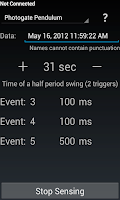
If you are running Ice Cream Sandwich (Android version 4.0), this update brings with it a visual refresh in alignment with the new look and feel.

For everyone else, Physics Gizmo will no longer close if you choose not to turn on Bluetooth. This is a bug I have wanted to resolve for a while, and I appreciate your patience.

Bluetooth is necessary to connect two phones as a photogate (video), but if you don't turn on Bluetooth the other sensors work just fine.

Thanks to everyone who uses and tells others about Physics Gizmo. Please let me know your comments, feedback, and requests and I would appreciate it if you leave positive feedback/rating in Google Play.

See the original Physics Gizmo post for more background and information about the app.

Subscribe to Brokenairplane to see how Education is shifting and educators are innovating!

Android + Science with Physics Gizmo

Science equipment can be expensive and yet many of your students have Android phones. Why not put this incredible technology to use for learning. Physics Gizmo allows you to collect scientific data in your classroom, at home, or even in space using only the phone.

Download Physics Gizmo from Google Play

Physics Gizmo is Open Source
I've put the source to Physics Gizmo on GitHub. If you are interested in helping me develop a tool for students to collect and analyze scientific data in an affordable way I encourage you to join the project.


Physics Gizmo on GitHub
Discussion Group Forum

For inspiration, here's an experiment using Physics Gizmo - via +Roberto Catanuto (@RobertoCatanuto)


Version 2.3
This version no longer requires you to turn on Bluetooth when the app starts. The only time you need to turn it on is if you wish to use two phones as a photogate (see below).


Version 2.2
Physics Gizmo is updated to version 2.2 for phones running Gingerbread, Honeycomb, or Ice Cream Sandwich.

If you are running Ice Cream Sandwich (Android version 4.0), this update brings with it a visual refresh in alignment with the new look and feel.

For everyone else, Physics Gizmo will no longer close if you choose not to turn on Bluetooth. This is a bug I have wanted to resolve for a while, and I appreciate your patience.

Bluetooth is necessary to connect two phones as a photogate (video), but if you don't turn on Bluetooth the other sensors work just fine.


Version 2.0
Now there are more opportunities to conduct scientific experiments with your phone.

New Sensors
Using the phone's proximity sensor (usually in the upper left of the phone), Physics Gizmo has three new options for collecting data:  
  1. Photogate Pulse - Triggered each time the proximity sensor is covered. Use it to count events. 
  2. Photogate Pulse with 2 Phones (Beta, only for Android 2.0+) - Connect two phones for accurate event timing. Similar to the 1 phone photogate but one phone starts the timer and the other one stops it. If you are tired of inaccurate experiments from human error with a stopwatch this is for you. See how long it takes for an object to fall or roll down a ramp like Galileo's and more! With Bluetooth's range ~30 ft/10 m there are many possibilities for learning. Watch a video of the 2 Phone Photogate in action.
    1. Click yes to turn on Bluetooth Discovery mode.
    2. Select another phone running Physics Gizmo from the list.
    3. The timer starts when the first phone's proximity sensor is triggered.
    4. The timer will stop when the second phone's proximity sensor is triggered.
  3.  Pendulum - Notoriously difficult to time accurately, an event is recorded for each completed full swing/period (two triggers) of a pendulum passing by the proximity sensor. Watch a video of the pendulum sensor in action.
Note:
  • If you don't see the new sensors your device does not have a proximity sensor (some tablets). 
  • If you don't enable Bluetooth in the beginning, you will not see the 2 phone photogate.


Updated Accelerometer Sensing
  • Continues to sense from the accelerometer even if the screen is turned off (note: be sure to try this with your phone as results may vary). Useful when the phone is in your pocket on a roller coaster.
User Interface 
  • New layout with higher resolution.
  • When finished sensing, press the "plus" button to add more time and sense again.
  • Pressing the question mark button in the upper right opens contextual help for you to successfully use Physics Gizmo and upload your data.

Using Physics Gizmo
  1. Turn on Bluetooth to access all sensors.
  2. Select your sensor
  3. Give your data a name or leave it with the time and date.
  4. Set the timer.
  5. Click start to collect data.
  6. Upload your data to analyze later using Google Docs, Fusion Tables, Geogebra etc. It is also saved in the ScienceData folder on the SD card as a csv.
Think of all of the experiments you can do, considering how much more likely you are to have enough phones in the classroom to do the experiment

I am really excited to see it used by students. I was originally inspired to create the app for my colleague who takes his students to Magic Mountain for Physics Day. Now they can collect accelerometer data on all of the rides and analyze the data back at class! That data will help them build their own roller coasters. The photogate sensors were inspired by my other colleague who creates pinewood derby cars but was always looking to improve the accuracy of the racing data.

The point is, now students can learn science with a phone they already use everyday. Please share in the comments how you used the app!


How Did I Get Here 
A while ago I created an app using Python and Android so everyone could collect data for science experiments. That post became one of my top all time read posts. But, I worried that all you did was read it. You see, I made a couple of mistakes that I wouldn't let students get away with:
  1. I made it relatively difficult to access. The instructions are there, and it would probably take about 20 minutes to get the app on your phones, but 20 minutes is a huge chunk of time in the Internet world and we have so much to do. I have seen people pass up learning Geogebra because they thought it would take too much time to learn!
  2. My second mistake was I didn't push myself to learn. Instead of learning Android programming, I asked all of you to do the work of getting it working so I could play it safe with Python. 
I decided to fix that right away. Now I love Python for its syntax, therefore Android (which is built upon Java) seemed more complex than I would have liked. But, if I wouldn't allow a student to get away with that, then I certainly couldn't.

So I did what I always do when trying to learn something new: I read, and read, and read until I stored up all of the confusing syntax and methods in my head. Keep in mind that this didn't make any sense to me whatsoever. 

Then I came across this excellent tutorial by Chris Blunt. It takes you through the setup, installation, and programming of an android timer app. The clear instructions, pictures, and hints made it really simple to see how an Android app comes together. Eureka! Everything clicked together and suddenly, I was writing all kinds of additions to the app. 

Now, that makes it sound pretty simple huh? Well there were still plenty of bumps in the road, but I did learn than programming for Android is a lot easier than I thought and it makes sense once you get the hang of it. Not to mention I had two powerful tools that kept me going. 
  1. Eclipse - It's free, it's open source and it's incredible! It will generate templates, spell check, find errors, suggest fixes. I can't imagine how I would have come this far without it. 
  2. The Web - Yes, I know it sounds obvious, but books take too long to root through and sometimes your question doesn't fit the examples in the book. I must give special appreciation to Stack Overflow which always seemed to have the right answer. Although, when it had a similar answer, but not the exact one I needed, it pushed me to understand the concepts even more.
The Apress are my favorite Android books so far. I used, Android Apps for Absolute Beginners, Beginning Android 3, and I just ordered Learn Java for Android Development so I can gain an even deeper understanding of how this works. I intend to fully immerse myself in Android programming this year so I can make some apps that can support learning.

Connect with BrokenAirplane and stay up to date with the best resources in education.

Follow my microblogging on Google+

Why I love my Android OS Smartphone

It is no secret that I love Google. Everything they make is so well integrated and well designed (ok Buzz and Wave had promise but oh well). I even helped test out Google Apps for our school and knew that it was going to be far more useful than Outlook for coordinating our meetings and working with our students.

So when the time came for a new phone, I knew I was going to go for an Android phone. I knew I would enjoy the email and calendar integration and maybe even a few apps but I had no idea how much I would enjoy it. When I first got my Android phone I was blown away by its potential. I kept remarking that this was the first phone that actually felt like a "smart phone" or a phone from the future.

Why I am writing this post, almost 2 years after I first got an Android phone? Well, our school provides our parent and students comments bi-annually. As fulfilling and enriching as this is for them, it is extremely time consuming to write 75 or so comments (especially when I have the FRC season underway). 

A couple of semesters ago, I realized that I could write comments while I was sitting in a line bored or riding shotgun up to Los Angeles to visit family. This has significantly reduced the strain and stress of doing comments and has prevented me from having to experience the hours of last minute comment writing that my comments.

Yesterday, I was writing a comment and needed to check the student's grade. I was able to switch back and forth between the gradebook website and my Gmail where I was writing my comments. It struck me just how Android allows me to be powerfully mobile.

How else do I enjoy my Android phone? Many probably misunderstand us smart phone users and think we are just Facebooking or Tweeting all day long (and some may be). Yet, I have become much more productive and efficient since having my phone and it has allowed me to maintain this blog, keep my FRC team, communicate with students and parents. 

Some of my favorite Android apps for Education and features are:
  • Dropbox: Having a networked drive that is easily accessible from the net is invaluable to a teacher. I cannot express how much I love backups of my stuff and the Android app is so wonderful with the ability to read and view almost any file.
  • Editing Google Docs: Really useful to be able to modify and collaborate on a document without being at a computer (Android 2.2 only)
  • Gmail and Google Calendar is so wonderful on an Android phone. Some write things down to remember them, I write them down to forget. Whether it is an idea or an event, I put it into my phone so I can spend my time and effort thinking about other things and being creative. With the updated Gmail app it is even easier for me to do these things. As a project based learning educator, I am always thinking of new ways to help students understand and apply information, and with my phone, I just send myself a little quick email (even at 2am) and no need to fret and concern myself with it anymore.
  • Rooting: Although I haven't yet done this for my Android 2.2 phone, rooting my HTC Hero made it much more enjoyable. The boost in speed was definitely worth it.
  • Tasker: My favorite Android app (next to Dropbox). It has a learning curve, but the Tasker wiki has some great tutorials. It allows you to customize your phone to your life and have it turn off the ringer at a certain time of the day or at School (based on GPS). There are countless other options to suit every possible need. While I still strongly support Free and Open Source, this app is definitely worth its price.
  • Versatility: The phone is basically open, which allows it to be used as my 8GB hard drive, mobile hotspot, robot remote control, and so much more.
For more apps, I suggest you check out the updated Best Android Apps for Educators and anyone else who wants to be incredibly productive.

While some might think that constant communication and access to information would be overwhelming and a drain on time, I have actually found the reverse. Of course out of the box, the phone has all of these notifications and reminders but I suggest you turn these off to suit your life. 

The fact is that, I enjoy the ability to get information, make reservations at a restaurant, communicate with my PLN and friends, get directions, and so much more. If you can get an Android phone I highly recommend it. My family uses Sprint because of the unlimited Data plan but there are many great plans out there. Let me know if you have any questions or suggestions on how to use Android to be more productive.

Subscribe to BrokenAirplane!

Android Apps You Will Love

My previous school used Google Apps for education and I was drawn to the idea of having my phone fully integrated with my email, calendar, docs, etc. I love my Android phone, even though it is a couple of years old, I still feel like I am holding a Tricorder. It is the first phone I have ever felt truly connected me to the world and did it well.

Since my Free and Open Source Software Suggestions is still one of the most looked at pages on BrokenAirplane, I figured a list of suggestions about my favorite Android apps for life, education, and otherwise might be helpful as well. These are certainly not exhaustive, just the ones I use frequently. 

Unless otherwise mentioned, these applications are all free. Now that the Google Play allows you to install directly to your phone, I have replaced the links so you can conveniently send them with one click.
  • Adobe Reader - Read PDFs on your phone.
  • AndroZip - Useful for opening attachments you download.
  • Astro - Browse the files on your phone, but it is best known for its ability to backup the applications on your phone.
  • Barcode Scanner - Scan barcodes and QR codes for quickly accessing information  (make your own QR business card here and here)
  • CardioGraph - Fantastic use of the camera to check your pulse.
  • Chrome - Sign in and keep all of your bookmarks and tabs available across alldevices.
  • Google Play Books - With Google's Play Bookstore, you can read on all of your devices.
  • Google Reader - This app seamlessly allows you to keep track of all of your blogs and RSS feeds. The interface is smooth and the sync works really well. Unlike some rss feed apps, you can do almost everything you can do on the computer Google Reader site (e.g. subscribe, search, follow from multiple accounts).
  • Google Sky Map - GPS and accelerometer equipped sky map. As you move your phone the map moves with you. If you use this every day or only a couple times a year it is still one of my favorite apps.
  • Google Translate - The power of this app was demonstrated to me when my students and I were able to communicate with other Robotics teams from around the World at Championships. Very powerful features like multiple languages and it will speak the translation as well.
  • GTasks - Google Tasks in Gmail is my todo list for getting things done. The app synchronizes so you don't have to go to a site.
  • HandyCalc - Powerful calculator with graphing and currency conversion.
  • NPR News - Useful for streaming the news and your favorite weekend shows.
  • Physics Gizmo - Now you and your students can do science without the cost of those expensive sensors. Blog post here.
  • PRemoteDroid - Allows you to remotely connect and control your computer. Use as a mouse, browse files. Really useful when you are teaching or away from your computer. Similar to Gmote but allows you to use Bluetooth as well. Download the software for your PC here.
  • Reddit Sync - Great interface and it's easy to open up the images/links/videos right from within the app. 
  • Seesmic - Love this Twitter app! I can quickly and easily post to Twitter and my Facebook page. I tried other apps and they were either slower or had less features. It has a lot of customizations for the look, frequency of updates, lists, and everything else you need in a Twitter app to connect to your PLN.
  • Shopper - Find out if you are really getting the best deal by scanning the object or barcode. The app will then tell you what Amazon, Ebay, Best Buy, etc are selling it for. I use this app for comparison shopping and I use the share function to remind my self of books I want to buy or take out from the library.
  • SL4A - This was the app I used to originally create Physics Gizmo. Great prototyping platform.
  • Smart Tools - (Free versions of each tool/Paid version puts them all in one app) uses your phones sensors to measure distance, height, angle, etc. Very handy.
  • WebMD - Simple interface, either click on where your symptoms are, check drug interactions, and more. Great for parents.
There are a ton more apps that I could have on my phone that I don't because I am trying to simplify my life and minimize distraction. What Android App can you not live without? Leave the link and description in the comments.