Showing posts with label arduino. Show all posts

What programming language should I use/learn?

I get asked often, "Which programming language should I start with?" or "I teach _______ which language would be the best for my classroom?" My goal is not to promote one language but show you the benefits of each of the more popular choices out there and let you make your own decision. There really is no one "best" language, just the best language for what you are interested in doing.

As always I promote technology that:

  1. Enhances or encourages learning. Programming is one great way to implement Computational Thinking into your class.
  2. The software is free and open source.

Disclaimer: These are intended to be a summary. They are presented in no particular order.

Python

Free? FOSS (Free as in zero cost and open source)
Requires an installation? Yes but there are web based options like sage math notebook. Python comes preinstalled on Mac and Linux.
Strengths: 
  • The syntax is very high level so you and your students can take your ideas and very quickly turn them into code. 
  • Python is interpreted so as soon as you press enter or run the code you can see the results. 
  • It has a large number of modules and support for graphics (e.g. VPython), physics, math, language parsing and more.
  • Great for prototyping, web, data mining/processing, and almost anything!
Recommended Tutorials:
    Codingbat


Javascript

Free? FOSS
Requires an installation? No
Strengths:
  • Coupled with HTML5 and CSS allows you to add a lot of power and interactivity to your web pages and applications.
  • Gives you to access web APIs (directory of available APIs) and use other services.
FYI: Javascript fails silently (meaning if there is a bug, it just won't work the way you intended, there won't be an error message) so use lots of debugging techniques and logs to debug. This is far easier than it may sound and is useful to learn regardless of what language you are using.
Recommended Tutorial:


Processing

Free? FOSS
Requires an installation? Yes
Strengths:
  • Designed to be very easy to make something visual, beautiful and/or interactive.
  • With both Processing and Arduino, it provides an introduction to C++ that is less intimidating.
Recommended Tutorials:
    Examples in the Processing software (Select File and then Examples)


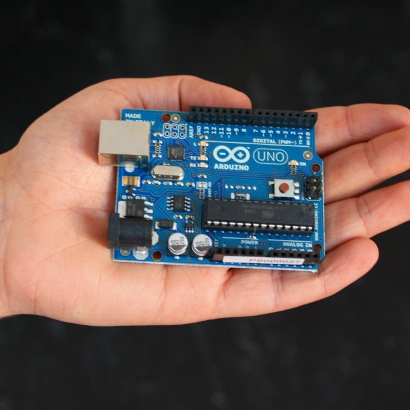
Arduino

Free? 
  • Hardware: No but Open Source (Sparkfun, Adafruit, and Radio Shack are trusted suppliers)
  • Software:  FOSS
Requires an installation? Yes
Strengths:
  • Works with off the shelf parts (e.g. motors, LEDs) to cheaply and easily build projects that sense, move, light up, etc.
  • Many "shields" are available to easily add functionality like Bluetooth, Wifi, audio, etc.
  • Hardware is relatively inexpensive (~$20-30)
  • Interfaces easily with Processing to add interactivity and data visualization.
Recommended Tutorials:
    Examples in the Arduino software (Select File and then Examples)
    Sparkfun Education

Subscribe and follow Phil for more on education and technology.

Please Support The "Arduino in Education" KickStarter Project

Support the Arduino in Education Kickstarter Project! Why should you?

Kickstarter is one of my favorite websites because it allows everyone to have a chance to have their dreams and projects realized. It is just one more of the crowdsourcing benefits of the World Wide Web.

I have talked at great length about our need to ensure that our students experience real world learning and in math/science I believe there is no greater skill than programming. Every single job is and will be influenced directly or indirectly by programming because of the enormous amount of data we collect, and those who have the most control over their data will be able to innovate and create far more than others.

Now, most will balk at the idea of programming with high school students. Especially since many of you were exposed to it in a very boring way. Thankfully there are much more interactive and enjoyable ways of learning programming and using programming. My favorites currently are Python and Arduino. Both are free to download and use. Arduino microcontrollers cost around $30 plus any electronic components you wish to use (sensors, LEDs, motors, etc). But this is far less expensive than the commerical products out there.

What I hear most often when I tell someone about a new technology they say, it will take too long or I will get to it later. This is why I create tutorials that break it down really simply so you can get started in less than an hour and see why this is so cool and perfect for your classroom. I was going to create an Arduino curriculum where students could learn an incredible amount of science while being able to program their sensors and directly interact with their data. The adage, teach a person to fish and they eat for a lifetime comes to mind.

As I was doing my initial research to create this curriculum, I came across Quarkstream and Steve Dickie's Electronics Page, both of these men, like me see the potential in Arduino and how it can reduce the cost of doing high quality physics in the classroom. Steve, has a Kickstarter project where he would like to refine and open source all of his materials to the physics community so we can all benefit from his 11 years of teaching electronics. I'll let him tell you about it:

If everyone who came to this blog each week gave the minimum $3, this project would be more than funded. Please do your part to help the open source community and your students get a quality 21st century skill that is really fun and applicable to their lives (artists, doctors, scientists, musicians, have all used the Arduino in their work). Even if you don't teach STEM (science, technology, engineering, and mathematics) perhaps you will see the benefit in doing so and give up a cup of coffee or pizza for a day to donate to this cause. We will do it for you when you create your Kickstarter project!

Learn Modern Electronics with Arduino

How much do you know about electronics? I am not talking about using your Android phone or your Wii, I mean how much do you know about making electronics? Chances are not much. Most textbooks have very little about the subject, including Ohm's law and maybe some DC Circuits but with most Physics teachers strained to get through all of Newton's Physics it is difficult to spend more than a week or two at best on the topic.

Yet, do we see catapults and inclined planes prominent in our society? No, but everyone wants the phone with the most transistors. Will your students know a thing about electronics? Lightbulbs and switches are a great start but anything invented after 1980 has a brain inside it and is more complex than a battery and some wire.

I would love to see a spring cleaning of the physics standards in this country. Most of us are taught, and subsequently teach a physics curriculum centered around ancient to renaissance discoveries/inventions. I know it takes a while for education to catch up to society but 500 years? If we are to help students innovate and become interested in STEM then we need to teach them relevent materials.

So what do I do with my students? If you follow my blog, you know I spend a lot of time helping them to create visual models of math and time learning how to program software. This year, through fundraising I am able to provide a new opportunity for my students to learn 21st century skills and science, physical computing.

Physical computing, is the act of taking software and having it interact with the physical world. This can occur through sensors and data analysis, movement via motors, sound and light, etc. I love it because it blends heavily with my philosophy that math is art. Although there are many avenues by which one can explore physical computing, I have discovered the easiest and most enjoyable way for students and teachers is through the Arduino Microprocessor.

A microprocessor is the brain of any electronics and is vital to running todays applications and programs. A microprocessor for our computers or even the ones inside my robotics team's robots can run a couple hundred dollars. But the Arduino is Open Source Hardware/Software and eventually via economics and design reached a price of less than $30! This is about the price for a family of four and far cheaper than much of the education science equipment out there.

What can it do? It is cliche, but the better question is what can't it do. Depending on what you connect to it, you can light a led, take temperature readings of a chemical solution every minute, create a toy car driven by a Wii controller, sense changes in acceleration or light, and the list goes on. It is designed for learning but powerful enough to do pretty much anything you want.

I have created a few video tutorials using Patrick's newest video tutorial methods (which we are going to release soon). Here is the first two in which I teach you how to make the LED fade in and out (like a Macbook).

In order to do this you will need:

  1. Arduino - As of this writing, the newest was the "Uno" which you could purchase from Sparkfun or your favorite electronics supplier. Don't forget to download the software!
  2. LED - This is your basic LED that you can purchase from Radioshack or any where else (Sparkfun)
  3. A couple of pieces of wire (jumper cables, not the ones that go in your car)
  4. The A-B printer cable which connects your Arduino to the Computer
That's it enjoy the tutorials! Afterwards, I'll share some great resources for learning more about Arduino. (I recommend making them full screen so you can see the code and what is happening).

Part 1: Pulse Width Modulation (PWM)
Part 2: The LED and Arduino

There are great ways to learn more about Arduino:
  • The main Arduino Page has a lot of free books and resources as well as explanations for all of the built in examples.
  • The Arduino Cookbook is an essential resource for any one who is serious about Arduino.
  • Learn from the great Lady Ada (aka Limor Fried) Arduino, electronics and more.
  • Udemy has a good overview of the Arduino, its parts, and how to get started.
  • Another video about PWM via Make Magazine
  • The 2011 First Quarter Issue of Make Magazine is all about Arduino. If you don't get the free newsletter or subscribe, you really owe it to yourself to do so.
I hope you take advantage of the convergence of cheap software/hardware and a large volume of free resources. Your students and the future will thank you!

Subscribe to BrokenAirplane to get all of the news and resources delivered to you!